Let me be honest with you — I love that AI tools have made creativity more accessible. ChatGPT, Midjourney, Canva AI — these tools have given business owners the ability to visualise ideas faster than ever before. And that’s genuinely exciting.
But there’s a big difference between using AI to explore ideas and handing AI-generated files to a designer expecting them to build a professional brand around them. I see this more and more, and I want to help you get it right — because when you come prepared, we can do so much more together.
Your Logo
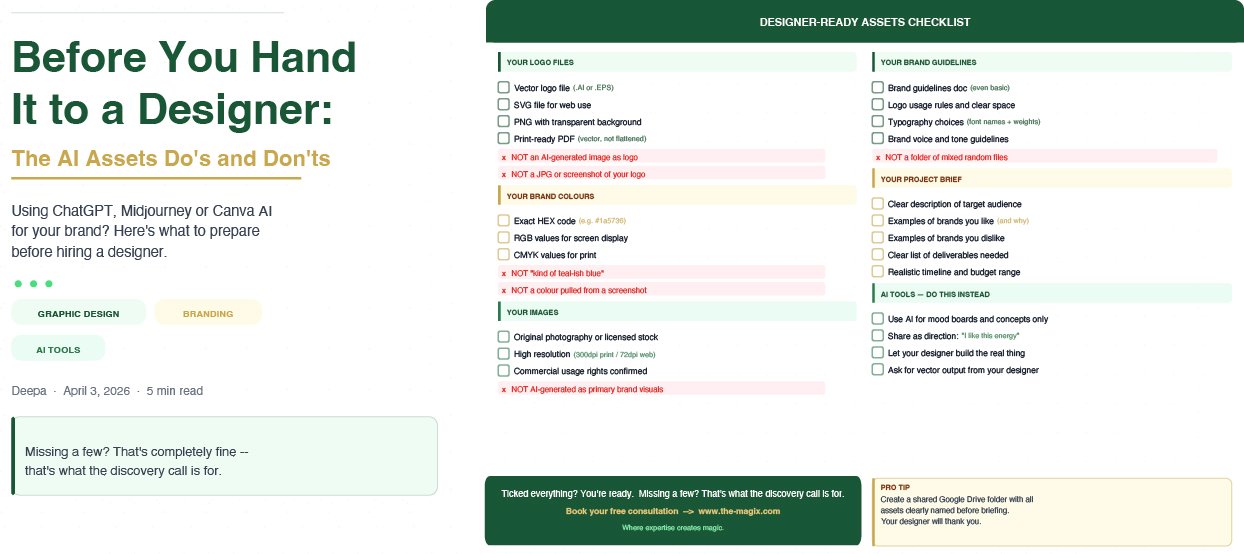
❌ Don’t: Hand over a ChatGPT or Midjourney-generated logo as your final brand mark. AI image generators produce raster images — flat, pixel-based files that cannot be scaled, edited, or used professionally. They also frequently contain distorted text and elements that fall apart in real-world use.
✅ Do: Use your AI-generated logo concept as inspiration — a mood, a direction, a feeling. Share it with your designer and say “I like this energy.” That’s incredibly useful. Just don’t expect it to be the final file.
✅ Do: Ask your designer to create a proper vector logo from scratch (in Adobe Illustrator) that captures that spirit — one that can scale from a business card to a billboard without losing a single pixel of quality.
Your Images
❌ Don’t: Use AI-generated images as core brand visuals — hero images on your website, featured images on your blog, or primary social media graphics — without telling your designer. AI images often contain subtle errors: extra fingers, warped backgrounds, text that makes no sense.
❌ Don’t: Assume AI images are copyright-free and safe to use commercially. This is still a legally grey area in many jurisdictions.
✅ Do: Use AI images for mood boards, placeholder visuals during a design brief, or internal concept exploration. They’re brilliant for that.
✅ Do: Invest in original photography — even a single well-lit phone shoot can outperform an AI image for authenticity and brand trust.
Your File Formats
❌ Don’t: Send JPGs of your logo and assume that’s enough. A JPG is a photograph format — it has a white background baked in, compresses every time it’s saved, and cannot be edited as a vector.
❌ Don’t: Screenshot your logo from a website or social media profile and send that. Screenshots are low resolution and entirely unusable for professional design work.
✅ Do: Always keep your original logo files in these formats:
- .AI or .EPS — editable vector files for your designer
- .SVG — scalable vector for web use
- .PNG with transparent background — for digital use
- .PDF (vector) — for print-ready work
Your Brand Colours
❌ Don’t: Say “it’s kind of a teal-ish blue” and leave it there. Colours look completely different across screens, print, and digital platforms.
✅ Do: Know your exact colour codes: HEX for web, RGB for screen, CMYK for print, Pantone for physical materials. If you don’t have these yet, your designer can establish them as part of your brand guidelines.
Your Brand Guidelines
❌ Don’t: Assume your designer can figure out your brand from a folder of mixed files and a vague brief. The less structure you provide, the more time gets spent on alignment instead of creation.
✅ Do: Come with a brand guidelines document — even a basic one covering your logo usage, colour palette, typography, and brand voice. It’s one of the most valuable documents your business can own.
The Bottom Line
AI tools are powerful starting points. They’re not finish lines. When you come to a designer with clear, organised, professional-grade assets, you get better work, faster turnaround, and a brand that holds up in the real world.
📩 Let’s take stock of your brand assets: www.the-magix.com